
222% up to $2,000 + 222 free spins
Welcome Package
Blaze Spins Login & Registration
Whether you are creating a new account or returning to play, the process here is direct. We built our access flow around three steps — register, verify, deposit — and every Canadian player aged 18+ can complete them in minutes. This page covers accurate registration, the sign-in sequence, withdrawal preparation and what to find the moment you land in the lobby. All amounts are in Canadian dollars.
Creating an Account That Works First Time
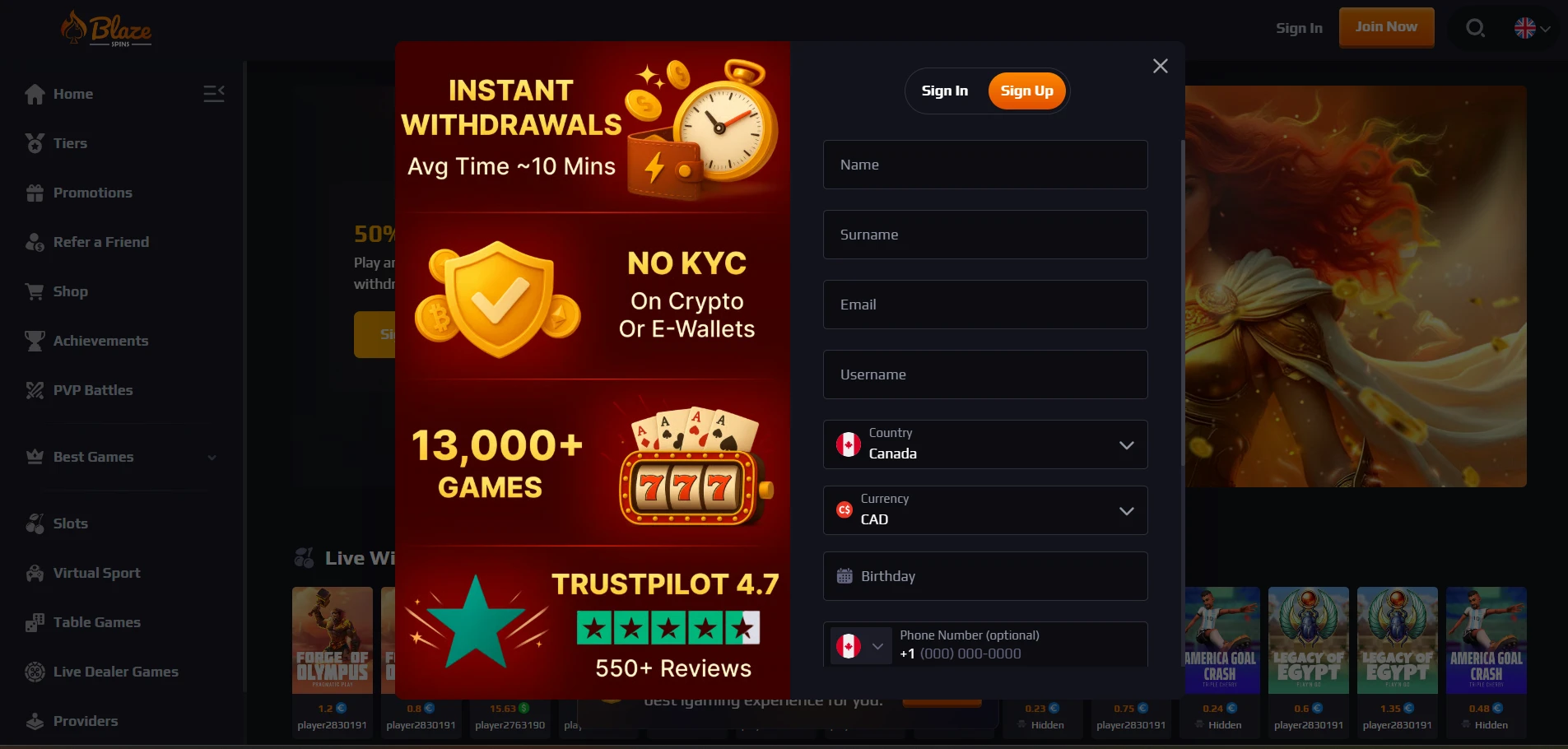
Accuracy at the point of registration prevents every avoidable delay that follows. Blaze Spins Casino registration requires you to submit details that match your real identity, because our KYC process may request supporting documents at any point, and mismatched information stops that check cold. The registration form collects your username, country (Canada), currency (CAD), birthday, phone number (+1) and password — each field matters.
Get these four things right from the start:
- Accurate email — the six-digit verification code goes here; a typo means it never arrives
- Secure password — mix letters, numbers and symbols; never reuse a password from another site
- Matching personal details — your name and birthday must match your government-issued ID
- Correct phone format — select +1 and enter a valid Canadian number
We cover the full range of Blaze gaming options available once your account is active, so it is worth taking an extra thirty seconds on the form to make sure every field is correct. Players who complete Blaze Spins sign up Canada with accurate details move through verification and into funding without interruption, which means less time waiting and more time at the tables.
The Sign-Up Sequence
Follow these stages in order and you will be playing within a few minutes of landing on our site for the first time. Blaze Spins delivers a three-stage process: form completion, email confirmation and deposit. Each stage must be finished before the next unlocks.
| Stage | Detail |
|---|---|
| Form | Enter email, create password, fill personal details (username, country, currency, birthday, phone) |
| Confirmation | A six-digit code is sent to your inbox; enter it on-site to verify your address |
| Deposit | Select the wallet icon on the homepage, choose your payment method, fund the account and begin |
After you submit the form, the confirmation code typically arrives in under a minute. Blaze Spins Casino registration is complete only after the six-digit code is accepted — the account stays unverified and inactive until that step is done. If you want to understand how the platform runs on mobile before you deposit, the Blaze app steps page explains browser access on iOS and Android in detail, and it is worth a look ahead of your first session. Keep in mind that Blaze Spins sign up Canada sets your currency to CAD at the form stage, and that choice cannot be changed later.
Getting Ready to Withdraw
Blaze Spins requires a few things to be in order before a payout request is processed. Our average payout time is 0–3 days, and choosing the right method is the single fastest way to stay at the low end of that range. Sort out these four points before you hit the withdraw button:
- Meet the minimum — $50 for Interac and debit/credit cards; $50 for most crypto options; $65.13 for Skrill; $81.41 for Neteller
- Choose a matching route — Interac and crypto settle in 24–48 hours; debit/credit cards take 3–10 business days
- Respond to document requests — KYC verification docs are requested at our discretion; responding promptly removes the main bottleneck
- Clear any active bonus — if a bonus is running when you request a withdrawal, the initial bonus amount is removed first and is non-restorable
The active Blaze promotions system explains the current terms for each offer so you can time your withdrawal request to avoid losing bonus funds. Blaze Spins processes crypto withdrawals reliably within the 24–48 hour window, making Bitcoin, Ethereum and USDT the quickest routes for Canadian players who want their funds fast.
Sign-In Problems Explained
Blaze Spins Casino login failures almost always trace back to one of a small set of fixable causes. Identifying the exact cause first saves time — resetting a password when the real issue is a locked caps key solves nothing. Use this table:
| Cause | Response |
|---|---|
| Typo in email | Re-enter the address carefully; copy-paste from your registration confirmation email if unsure |
| Wrong password | Use the password reset link; check that caps lock is off before trying again |
| Expired session | Log in again; sessions time out after inactivity for security reasons |
| Unverified account | Check your inbox for the six-digit code and complete the verification step |
| Browser cache issue | Clear cookies and cache, then reload the page before attempting sign-in |
Our platform runs on 256-bit SSL encryption, so the connection itself is not the cause of a failed login — the credentials are always the place to check first. Blaze Spins identifies access patterns that look suspicious and may flag an account for review, which is another reason to keep your email address current and accurate. If none of the table fixes work, our 24/7 live chat reaches a support agent directly.
Inside the Lobby After Login
The interface gives you everything you need immediately after sign-in, without having to navigate away from the main screen. Blaze Spins puts 13,000+ games from providers including Pragmatic Play, Evolution and BGaming into a lobby that is organised for fast access, and the mobile version runs in both portrait and landscape mode without a download.
Four elements are available the moment you land:
- Search field — type any game title or provider name for instant filtered results
- Bottom menu — quick-jump links to promotions, the Coin Store and account settings
- Promotions shortcut — one tap reaches the daily reload, PVP Battles and Drops & Wins prize pool up to $2,000,000
- Game categories — Slots, Live Games, Table Games, Crash Games, Baccarat, Blackjack, Roulette, Game Shows and Poker are separated into clear tabs
After the Blaze Spins login lands you in the lobby, the bottom menu is the fastest route to the Coin Store, where 270 coins exchange for up to 100 free spins on specific titles. The VIP Tiers Program — starting at Bronze III and climbing to BlazeCrown across 10 levels — also tracks progress from within your account dashboard, and you earn 1 point per $100 turnover to fuel your Shop Points balance.
Guarding Your Credentials
A strong, unique password is your first line of defence, private device access is your second, and a strict no-sharing rule on your account profile is our policy. Blaze Spins Casino login credentials belong to the registered player only — account sharing is prohibited, and any suspicious activity detected on a profile can trigger a security review. We enforce this to protect your balance and your personal data, not to restrict you.
Use a password that mixes upper and lower case letters, at least one number and one symbol, and never recycle it from another account. Log out of your account when you are done on a shared or public device — our session does not close automatically until inactivity triggers a timeout, and on a shared machine that window is long enough for another user to act. Two-factor control of your email address is equally important: because a six-digit code goes there during registration and password resets, whoever controls that inbox controls the account. Our 256-bit SSL connection secures data in transit, but protecting credentials on your end remains your responsibility.
Advice for Careful Registrations
Players who benefit most from our setup are those who treat the registration form as a document rather than a form — entering details that match an ID they are prepared to submit. Blaze Spins Casino registration ties your account to real identity data from the start, and that alignment pays off when KYC is triggered before a withdrawal. The 222% welcome bonus up to $2,000 plus 222 free spins, the VIP cashback ladder and the daily reload options are all accessible only through a verified, accurately registered account. Getting the form right once means you never have to chase a blocked withdrawal or a delayed verification — the account simply works, from first deposit to first cashout.
Frequently Asked Questions
How do I avoid withdrawal delays?
Use Interac or a cryptocurrency such as Bitcoin or Ethereum — both settle within 24–48 hours and are the fastest options available to Canadian players. Make sure no bonus is active when you submit the request, because an active promotion triggers the removal of the initial bonus amount before the withdrawal proceeds. Blaze Spins login confirms your session, and from there the wallet button next to your balance is where you initiate the payout.
What is the minimum I can withdraw?
The floor is $50 for Interac, debit/credit card and most crypto methods, $65.13 for Skrill and $81.41 for Neteller. Blaze Spins sets these minimums per method, so check your chosen route before requesting a payout — submitting a withdrawal below the threshold simply fails to process. Crypto minimums are quoted in USD in the source data, so the figures above reflect that.
Where is the search function?
The search field sits at the top of the lobby immediately after you sign in, and it filters across all 13,000+ games by title or provider name in real time. On mobile the bottom menu also contains a direct shortcut that opens the search bar without scrolling, and it works in both portrait and landscape orientation.
What happens to an active bonus when I withdraw?
If you request a withdrawal while a promotion is active, the initial bonus amount is removed from your balance first, and that portion is non-restorable. Bonus funds are not withdrawable as cash under any circumstances — only real-money winnings that have cleared any applicable playthrough requirement qualify for payout. Clear the wagering before withdrawing to keep every dollar you have earned.
Can someone else use my login?
No. Blaze Spins Casino login credentials are issued to the registered player and must not be shared. A shared account violates our terms, and any account found to be accessed by more than one person is subject to review and possible restriction. Self-referral in the Refer-a-Friend programme is also strictly prohibited, so creating duplicate accounts to bypass this rule is not an option.